

AEC Technology Insights
How artificial intelligence handles real architecture and engineering work, and what it means for your firm.
Reid McConkey, Founder & CEO & Christopher Briggs, Principal Consultant | Resolved
At a Glance
We sat down with Claude, Anthropic’s AI assistant, and ran it through six real tasks that architecture and engineering professionals handle every week: RFI responses, specification review, building code calculations, meeting minutes, project data analysis, and client communications. The results were concrete and, in several cases, genuinely impressive. This post walks through each test, shares honest assessments of what worked, and is equally candid about what AI cannot do today.
Last week, we published a piece arguing that AI is moving beyond incremental productivity gains for architecture and engineering firms, that the competitive landscape is shifting in ways firm leaders need to take seriously. The response was immediate and clear: firm owners get it. The question we heard most wasn’t whether this matters. It was what does this actually look like right now?
Fair question. So we sat down with Claude, Anthropic’s AI assistant, and put it through a series of tasks that architecture and engineering professionals deal with every week. Not hypothetical scenarios. Real work. We wanted to see what it could do today, where it falls short, and what it tells us about where this is heading.
Here’s what we found.
What Is Claude?
For firm leaders who’ve heard the name but haven’t used it: Claude is a large language model built by Anthropic. Think of it as a highly capable text-based assistant that can read documents, draft content, analyze data, answer technical questions, and reason through complex problems. You interact with it through a chat interface. Type a question or paste a document, and it responds.
It’s not architecture software. It doesn’t produce drawings or models. What it does is handle the enormous volume of written, analytical, and administrative work that consumes your team’s time every day.
For our test, we assumed most people would pick the Pro plan ($20/month USD) to start off.
The Tests
We selected six tasks that represent common, time-consuming work in an architecture or engineering practice. For each one, we gave Claude the same information a team member would typically have and evaluated the output against what a competent professional would produce.
1. Drafting an RFI Response
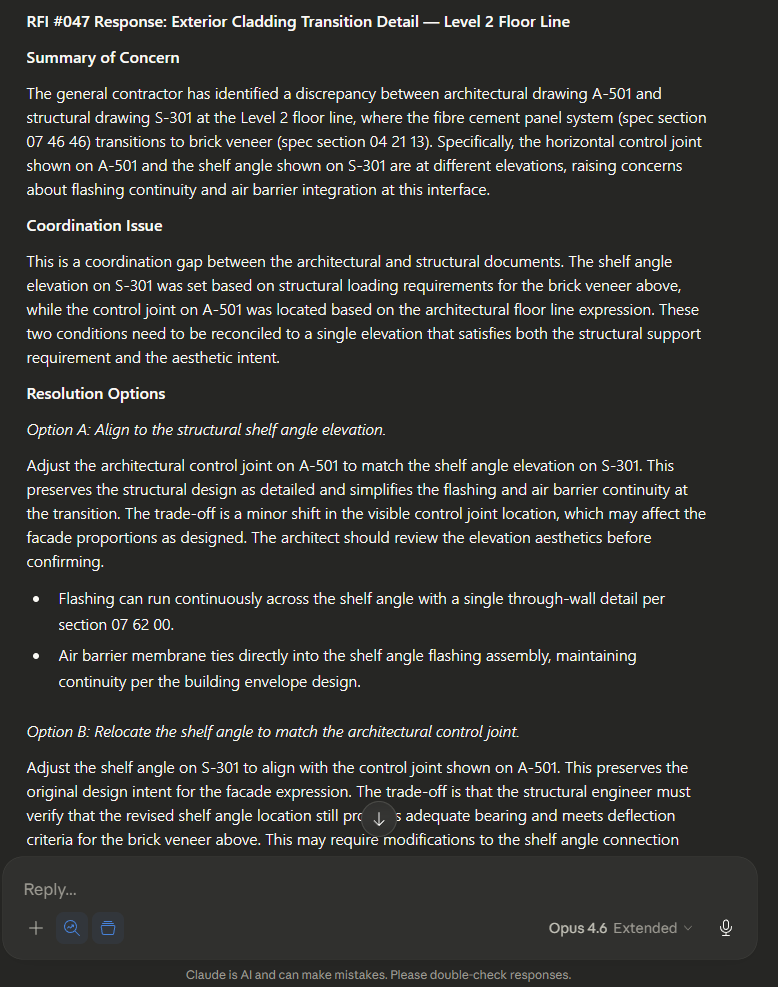
The task: We provided Claude with a Request for Information regarding exterior cladding interface details on a mid-rise residential project. The RFI referenced specific drawing sheets, specification sections, and a general contractor’s concern about the transition between two cladding systems at a floor line.
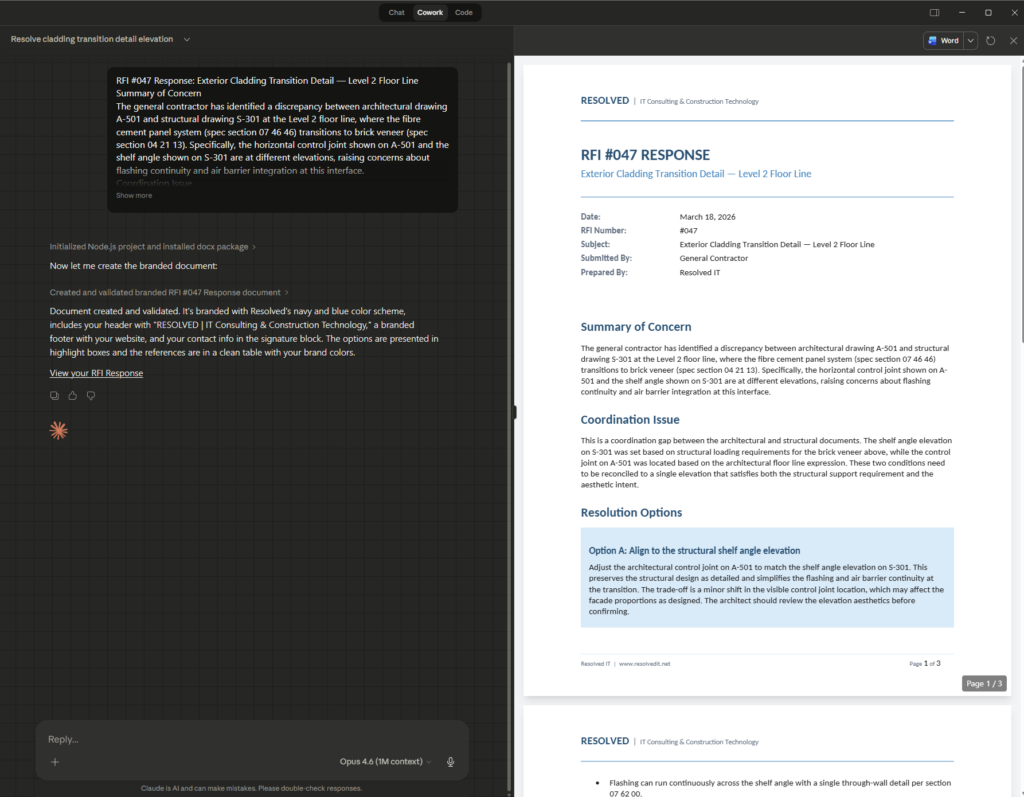
What Claude produced: A structured RFI response that addressed the contractor’s concern directly, referenced the relevant specification sections, identified the coordination issue between architectural and structural drawings, and proposed two resolution approaches with trade-offs for each. The tone was professional and appropriate for consultant-to-contractor communication.
Now let’s convert it to a word document…
Finally, let’s brand this document by simply uploading our company logo and saying “Brand this.”
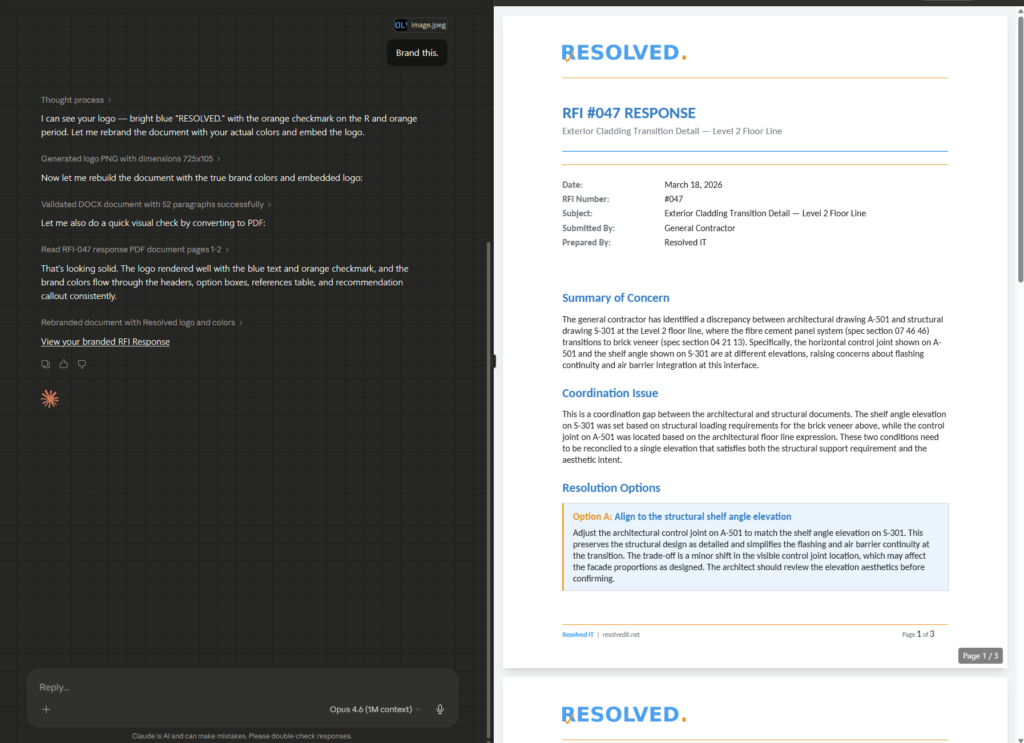
Assessment: The response would need review by the project architect, particularly the technical recommendations, but the drafting work that typically takes 30 to 45 minutes was reduced to under five. The structure, tone, and cross-referencing were strong. A senior architect reviewing this would be making refinements, not starting from scratch.
2. Summarizing a Specification Section
The task: We pasted a full specification section (Division 07 92 00, Joint Sealants) and asked Claude to summarize the key requirements, highlight anything that deviates from standard practice, and flag items that typically cause issues during construction.
What Claude produced: A clear summary organized by submittals, materials, execution requirements, and quality assurance. It correctly identified the performance criteria, called out the requirement for a pre-installation conference (often missed), and noted that the spec required a 10-year warranty rather than the more common 5-year term.
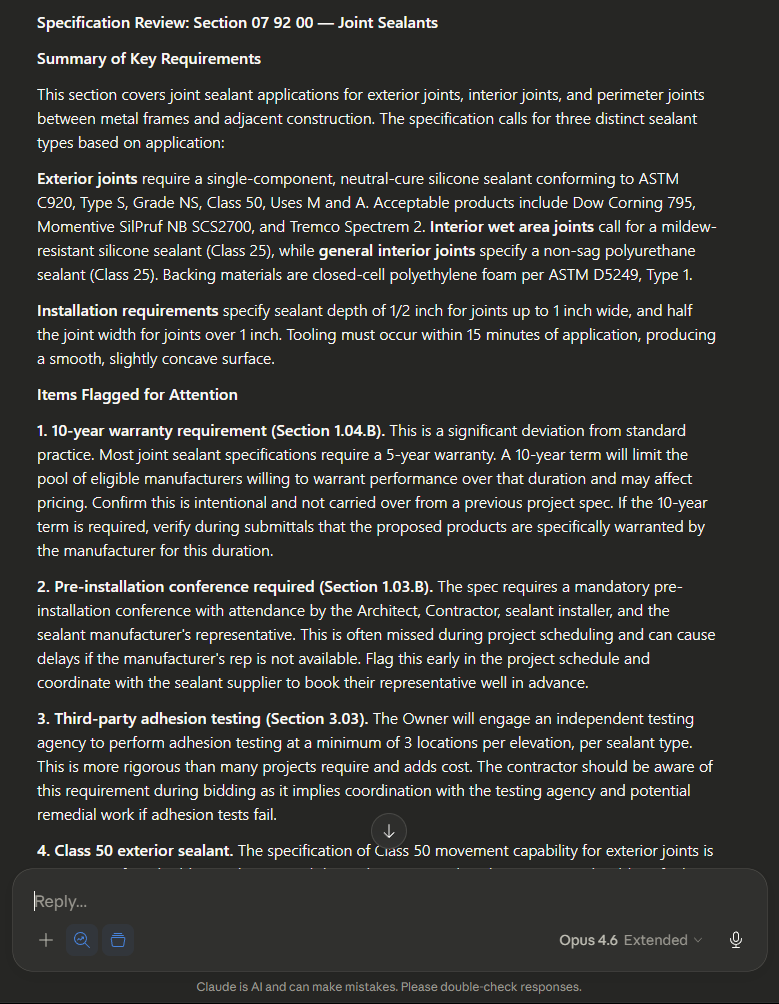
Assessment: This is the kind of task that typically falls to a junior staff member who may or may not catch the non-standard warranty provision. Claude caught it immediately and explained why it matters. For specification review during bidding or project setup, this is genuinely useful today.
3. Building Code Compliance Question
The task: We asked Claude a question about occupant load calculations for a mixed-use building with a ground floor restaurant, upper floor offices, and a rooftop amenity space, referencing the National Building Code of Canada.
What Claude produced: A step-by-step breakdown of occupant load calculations by use and floor, correctly identifying the appropriate load factors for assembly, business, and mercantile occupancies. It addressed the rooftop amenity space as assembly occupancy and correctly noted the impact on exit width calculations and plumbing fixture counts.
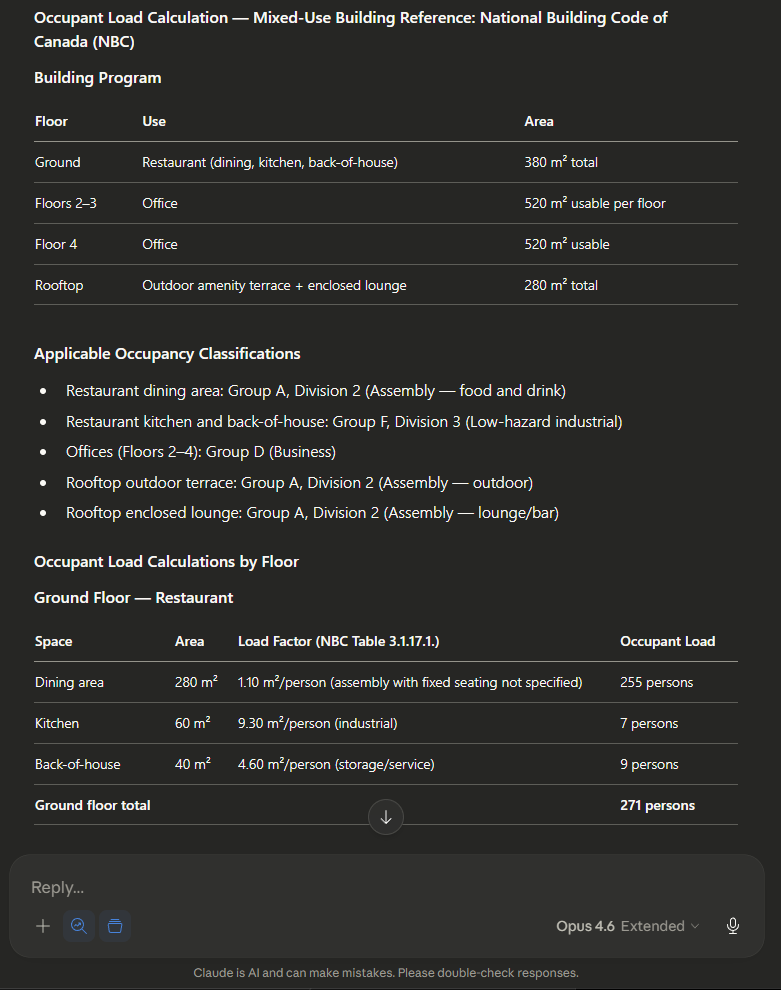
Assessment: The methodology was sound and the code references were appropriate. However, and this is important, Claude’s knowledge has a training cutoff. It may not reflect the most recent code amendments or local municipal interpretations. This is a research accelerator, not a code compliance sign-off. Every output needs professional verification. That said, the time savings on the research and calculation setup is substantial.
4. Meeting Minutes to Action Items
The task: We pasted raw, unstructured notes from a project coordination meeting, the kind of notes someone takes on a laptop during an OAC meeting. Roughly 1,500 words of stream-of-consciousness text with multiple speakers, tangents, and unresolved items mixed together.
What Claude produced: Organized meeting minutes with attendees, key discussion points, decisions made, and (most valuably) a clear action item table with responsible parties, descriptions, and deadlines extracted from context.
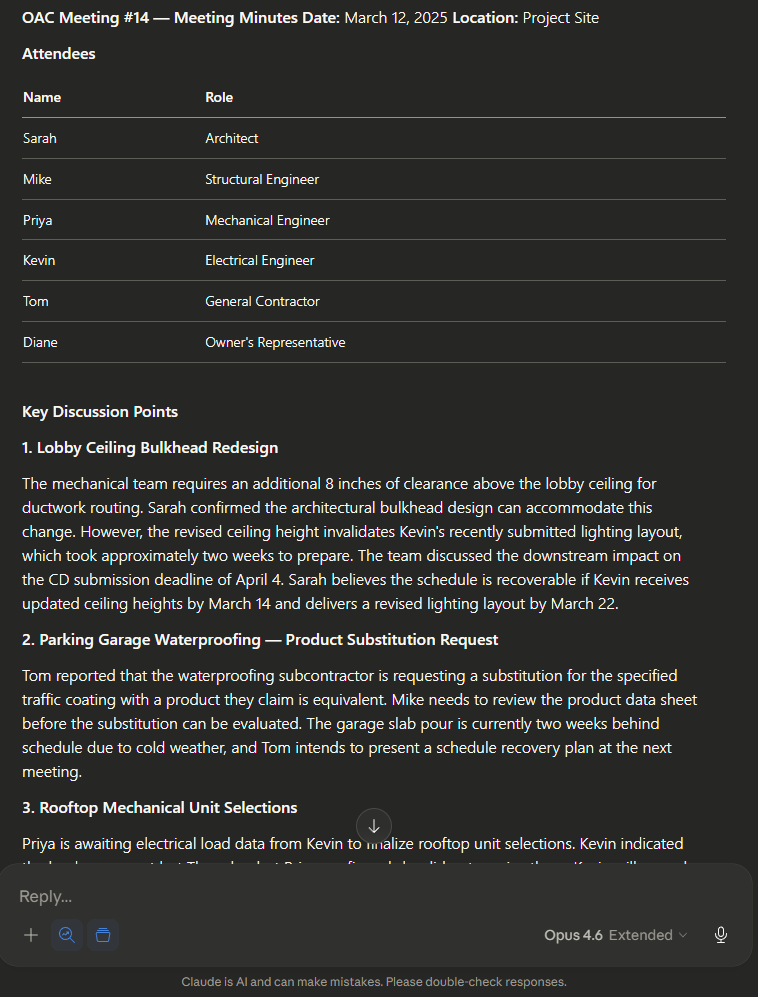
Assessment: This was one of the strongest results. The action items were accurate, correctly attributed, and the deadlines were inferred from context where they weren’t explicitly stated. This task typically takes 30 to 60 minutes of post-meeting cleanup. Claude did it in seconds. For project coordinators and junior PMs, this alone could recover hours per week.
5. Project Data Analysis
The task: We uploaded a CSV export of project hours by phase and discipline for a twelve-month period and asked Claude to identify where the project was trending over budget, which disciplines were driving the variance, and what it would recommend reviewing.
What Claude produced: A clear analysis identifying that structural engineering hours were 34% over the Phase 3 budget allocation, driven primarily by revision cycles in months 7 through 9. It flagged that architectural hours were tracking under budget but noted this often indicates scope deferral rather than efficiency. It recommended three specific areas for project manager review.
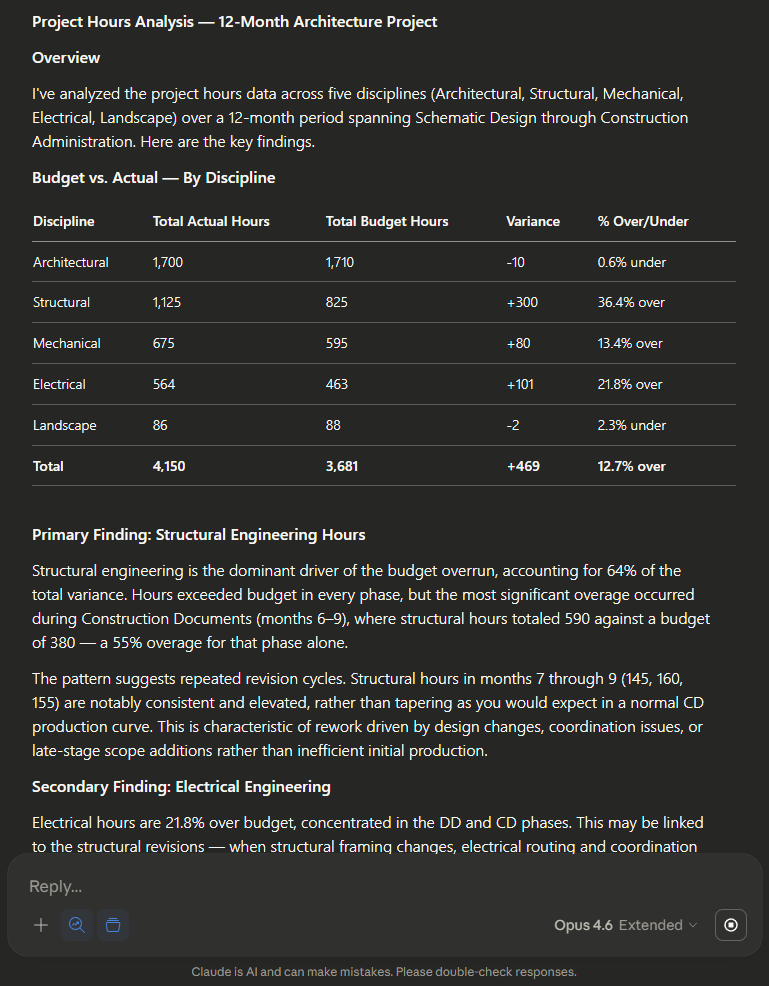
Assessment: This was one of the strongest results. The action items were accurate, correctly attributed, and the deadlines were inferred from context where they weren’t explicitly stated. This task typically takes 30 to 60 minutes of post-meeting cleanup. Claude did it in seconds. For project coordinators and junior PMs, this alone could recover hours per week.
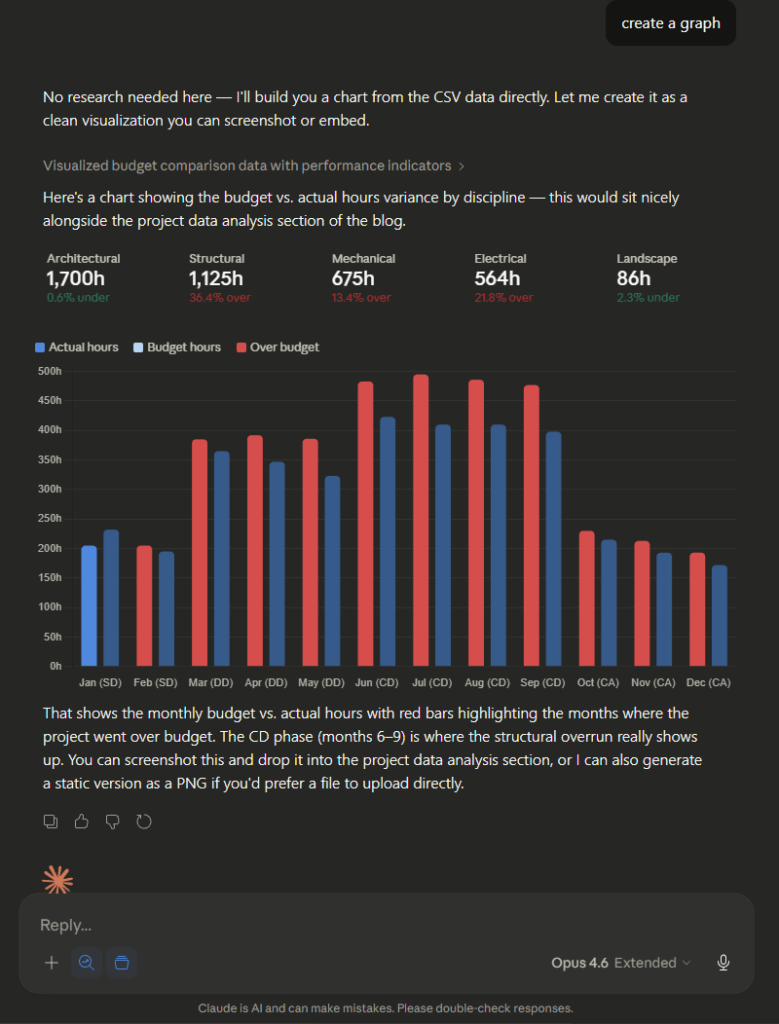
We can even ask it to visualize this data in whatever way we want…
6. Client Email Drafting
The task: We gave Claude the context for a sensitive project communication: a design milestone was going to be delayed by two weeks due to a regulatory review taking longer than anticipated. The client needed to be informed with an explanation, revised timeline, and proposed mitigation.
What Claude produced: A professional, well-structured email that acknowledged the delay without being defensive, explained the cause clearly, presented a revised milestone schedule, and proposed concurrent work on unaffected deliverables to minimize downstream impact. The tone struck the right balance between transparency and confidence.
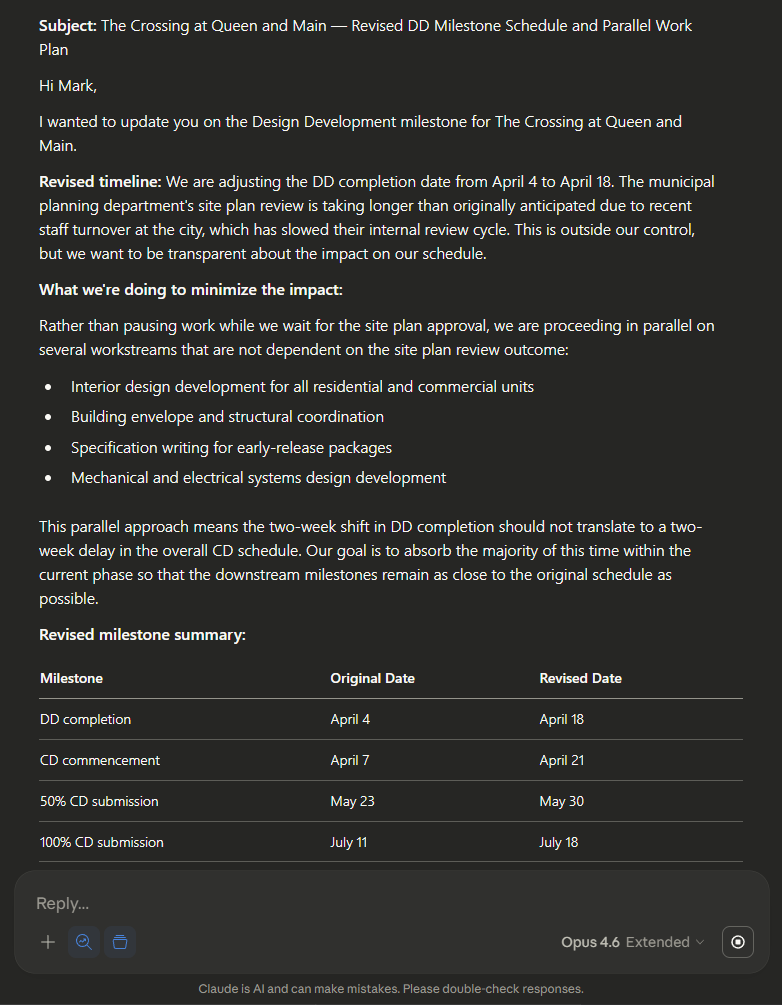
Assessment: The email was ready to send with minor edits. The framing (leading with the revised plan rather than the problem) is exactly how an experienced project manager handles these communications. For staff who struggle with client-facing writing or spend excessive time drafting sensitive communications, this is a significant time saver.
What Claude Can’t Do
Being honest about limitations matters more than being enthusiastic about capabilities. Here is where Claude falls short today.
It doesn’t know your projects. Claude has no inherent access to your project files, your Revit models, your historical data, or your standards- at least not out of the box. Every interaction starts from zero unless you provide the context. This is the single biggest limitation for day-to-day use, and it is why data organization matters so much. We help our clients connect project data and integrate applications into Claude to solve this issue.
It can’t produce drawings or models. Claude works with text, data, and documents. It won’t generate a detail, produce a Revit family, or run an energy simulation. The design production tools in your practice are a separate category entirely.
Its knowledge has a cutoff. Claude doesn’t always browse the internet in real-time. Building codes, product specifications, and regulatory requirements change. Anything Claude tells you about code compliance or product performance needs to be verified against current sources. You should ideally download the latest building codes from official sources and providing them to Claude.
It doesn’t replace professional judgment. This bears repeating. Claude can draft, summarize, analyze, and organize. It cannot stamp a drawing, carry professional liability, or understand the specific relationship dynamics on your project. The human professional is not optional.
Confidentiality requires attention. When you paste project data into any cloud-based AI tool, you need to understand where that data goes. Anthropic’s data policies are more protective than most, but firms handling sensitive pre-construction data, competitive proposals, or client financial information should establish clear guidelines about what can and cannot be shared with external AI tools.
What This Means for Your Firm
We ran these tests in a few hours. The tasks we tested represent work that consumes thousands of billable hours across a typical architecture or engineering practice every year. Meeting minutes. Email drafting. Specification review. Code research. Project analysis.
None of these tasks require genius. They require time, attention, and competence. That is exactly the kind of work AI handles well, and it is exactly the kind of work that currently buries your most experienced people in administrative overhead instead of freeing them for the judgment-intensive, high-value work that actually drives your practice.
The tools available today, right now, for $20 a month, are not the end state. They are the starting point. The firms that start building familiarity with these tools today will be the firms that adopt AI-native workflows first when they arrive. Not because they bought the right software, but because their people were ready.
Where to Start
If this article is the first time you’ve seriously considered what AI could do in your practice, here are three steps worth taking this month.
Try it yourself. Open Claude (claude.ai) and give it a task from your actual work. An RFI. A spec section. Meeting notes. See what it produces. Form your own assessment.
Think about your data. The biggest constraint on AI effectiveness in your firm is not the AI. It is whether your project data, standards, and institutional knowledge are organized in a way that AI tools can eventually access and use. If your project archive is scattered across personal drives and email attachments, that is the first problem to solve.
Have the conversation. Talk to your partners, your project managers, your team. Not about whether AI will change your practice (it will), but about how your firm wants to approach it. The firms that navigate this well will be the ones that brought their people along.
Coming next week
How to connect Claude to your Microsoft 365 environment, which AI models to use for different types of work, and how Claude’s Cowork feature can automate routine tasks on a schedule. March 26.
Stay in the Loop
Subscribe for technology strategy insights for architecture, engineering, and construction firms.
Thanks – you’ve been subscribed.
Or reach out directly: info@resolvedit.net | 604.335.5574 | resolved.ca